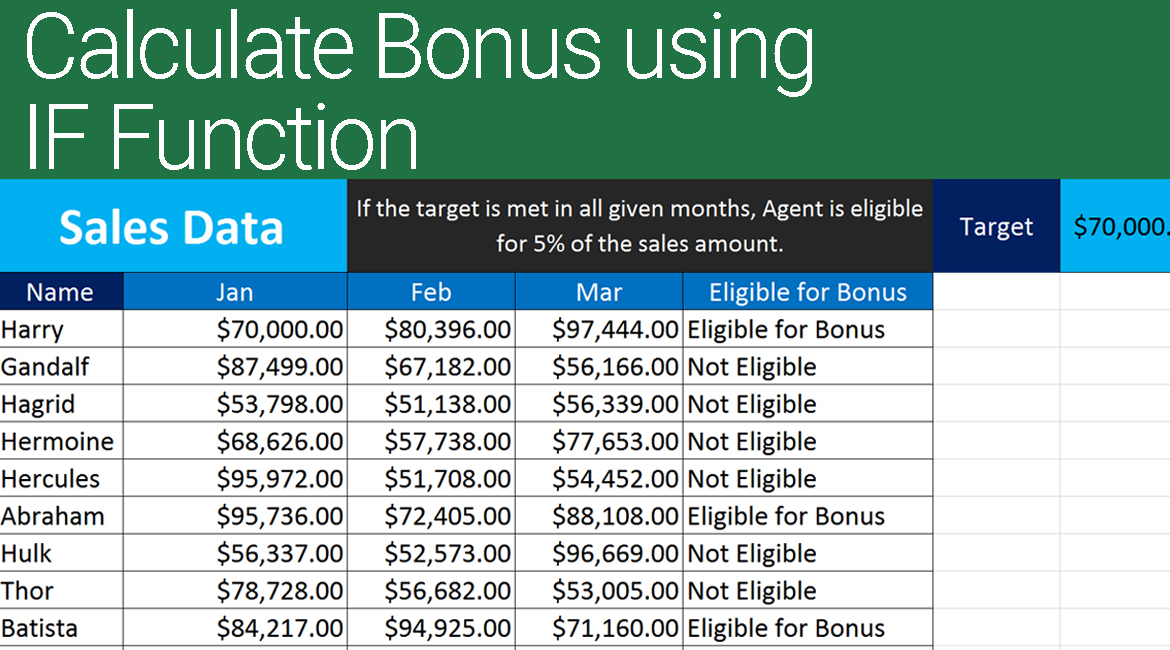

Calculate Bonus in Excel Using IF Function video demonstration will help you to understand how you can use if function to calculate bonus of given set of employees.
In this video demonstration, we also covered how we calculated the results using the combination of IF & AND function and IF & OR function which were given as assignments in the previous video demonstration.
By the end of this video, you should be comfortable to use the IF function clubbed with AND or OR function.
Video Demonstration
Click on the following button to download the file used in the demo to practice along with us.
We have also covered absolute reference very briefly under this video.
Excel Learning Series – TOC
- Excel 2016 – Basics – Find Sum, Average, Min and Max
- Excel 2016 Difference Between Formulas and Functions
- Excel 2016 Copy Formulas or Functions
- Microsoft Excel Auto Fill
- Excel 2016 Manage Views using Freeze Panes
- Microsoft Excel – Saving Workbooks
- Excel Upper and Lower Text Functions
- Excel 2016 – Text Function – Proper
- Excel Text Functions – Trim Function
- Excel – Text Function Left Function
- Excel Text Function – Right Function
- Excel Text Functions – MID Function
- Excel Concatenate Text Function
- Excel Nested Functions
- Excel Search Function
- Excel – Calculate Age using Date Function Today
- Calculate Tenure in Excel with Days Function
- Autofill Dates in Excel
- Formatting Dates in Excel
- Excel Date Format Shortcut
- Calculating Sum of Time in Excel
- Calculate Expiry Date in Excel 2016 – EDATE
- Find Age or Tenure using DATEDIF in Excel 2016
- RandBetween – Generate Random Dates in Excel 2016
- Excel Weekday Function
- Excel WeekNum and ISOWeekNum Functions
- Excel Networkdays and Excel Networkdays.INTL
- Excel Workday and Workdays INTL Functions
- Excel DATEVALUE AND TIMEVALUE
- Calculate Time Difference in Excel
- Calculate Quarter in Excel
- Rounding Day, Hour and Minutes in Excel
- Excel Pay Rate and Downtime Cost Calculation
- Excel Logical Functions IF, AND, OR
- Calculate Bonus in Excel Using IF Function
- Excel Learning – SumIF and SumIFS
- How to use Excel Count Functions
- How to use VLOOKUP in Excel
- How to vLookup in a different workbook in Excel
- VLookup for Multiple Sheets with Example
- Excel Custom Quarters
- Vlookup Return Custom Value
- Vlookup Based on Dropdown Selection
- HLookup in Excel
- Locate information using Match Function in Excel
- Converting Numbers to Words in Excel with VBA: A Step-by-Step Guide
- Excel Drop Down List Multiple Selection
- Show The Time Difference In Excel In Minutes Only
- Excel 2016 – Basics – Find Sum, Average, Min and Max
- Excel 2016 Difference Between Formulas and Functions
- Excel 2016 Copy Formulas or Functions
- Microsoft Excel Auto Fill
- Excel 2016 Manage Views using Freeze Panes
- Microsoft Excel – Saving Workbooks
- Excel Upper and Lower Text Functions
- Excel 2016 – Text Function – Proper
- Excel Text Functions – Trim Function
- Excel – Text Function Left Function
- Excel Text Function – Right Function
- Excel Text Functions – MID Function
- Excel Concatenate Text Function
- Excel Nested Functions
- Excel Search Function
- Excel – Calculate Age using Date Function Today
- Calculate Tenure in Excel with Days Function
- Autofill Dates in Excel
- Formatting Dates in Excel
- Excel Date Format Shortcut
- Calculating Sum of Time in Excel
- Calculate Expiry Date in Excel 2016 – EDATE
- Find Age or Tenure using DATEDIF in Excel 2016
- RandBetween – Generate Random Dates in Excel 2016
- Excel Weekday Function
- Excel WeekNum and ISOWeekNum Functions
- Excel Networkdays and Excel Networkdays.INTL
- Excel Workday and Workdays INTL Functions
- Excel DATEVALUE AND TIMEVALUE
- Calculate Time Difference in Excel
- Calculate Quarter in Excel
- Rounding Day, Hour and Minutes in Excel
- Excel Pay Rate and Downtime Cost Calculation
- Excel Logical Functions IF, AND, OR
- Calculate Bonus in Excel Using IF Function
- Excel Learning – SumIF and SumIFS
- How to use Excel Count Functions
- How to use VLOOKUP in Excel
- How to vLookup in a different workbook in Excel
- VLookup for Multiple Sheets with Example
- Excel Custom Quarters
- Vlookup Return Custom Value
- Vlookup Based on Dropdown Selection
- HLookup in Excel
- Locate information using Match Function in Excel
- Converting Numbers to Words in Excel with VBA: A Step-by-Step Guide
- Excel Drop Down List Multiple Selection
- Show The Time Difference In Excel In Minutes Only
I hope that you’re enjoying learning Excel through this Excel learning series with Syed. I request you to share these videos with anyone who desires to learn Excel from scratch.
Kindly subscribe to our YouTube channel and enable notifications by clicking on the bell icon to receive updates about new videos as and when they are added to keep up with Excel Learning.
We hope you find this post useful. In case you are stuck and or need help, feel free to drop a comment below or submit your question. Do share it further and add your feedback about the article in the comments section.
These functions apply to: Excel 2019, 2007, Excel 2010, Excel 2013, Excel 2016, Office 365 and above #excelLearningSeries #excel #excel2016 #excelLogicalFunction #HowWeExcel #excelconditionalfunctions




I have a formula that I am entering using the IF function in the PowerPoint 2016 Excel book that is not coming out valid: [Years of Service]>=10 comes up invalid, next ‘Data Tables’!$B$19, comes up 500, next IF([Years of Service]>=5,’Data Tables’!$B$18,’Data Tables’!$B$17) comes up with all that I wrote. I need to have a false or true answer indicating who will get the bonus but a syntax warning pops up. I have asked my Professor she had me use another formula which did not work! I am stuck! Do you have any suggestions. My email carmenlove2003@yahoo.com would appreciate it tremendously!
If you can, please share some sample data and i can do the formulas for you. I’ll explain in the email what i did to get to the solution. Just prepare drive sample data that looks similar to the original data you have and mail it to hussaini.syed@gmail.com